Facebook Lead Ads Quality Checklist: Find Where Good Leads Are Lost
Bad Facebook leads? Check delivery, qualification and follow-up with a lead quality scorecard, fictional CPL comparison and copyable audit prompt.
Your Facebook lead ads look inexpensive, but the client says the leads are bad. Before replacing the audience, find out what “bad” means: invalid details, poor fit, no response, missing CRM records or no eventual purchases.
Those are different problems. They require different checks.
Use this lead quality checklist to separate acquisition quality from delivery, qualification and follow-up. It includes a simple scorecard, a fictional comparison and an AI prompt you can use with redacted evidence.
1. Agree on a qualified lead before judging the campaign
A submitted form is an inquiry. Whether it is qualified depends on the offer and the criteria the business can actually serve.
For a fictional online course, qualification might mean the person wants that course, meets its stated prerequisites and understands that it is paid. For a consultation offer, it might mean the request fits the service scope and availability.
Write one sentence:
A qualified lead is a distinct inquiry that meets [specific offer-fit conditions], assessed using [evidence] within [review window].
Use the same definition for the campaigns you compare. Do not quietly tighten it for a new campaign or count every unanswered email as proof of poor fit.
Separate these statuses in your working record:
| Status | Meaning | Evidence to record |
|---|---|---|
| Pending review | Not assessed yet | Creation time and review deadline |
| Invalid | Unusable or demonstrably false details | A documented validation finding |
| Out of scope | Does not meet the agreed offer criteria | Specific reason, not “bad lead” |
| Qualified | Meets the documented criteria | Assessment and date |
| Duplicate/test | Repeated record or an identified QA submission | Duplicate reference or test label |
Track contact attempts, replies, purchases and contact permission in separate fields. They describe other parts of the process; they should not overwrite the qualification reason.
2. Check that the leads reached the team
Start with a redacted sample from the source form and match it to the intended CRM or Google Sheet using a stable lead reference. Compare timestamps and account for the integration’s expected processing time.
Check:
- Is the integration connected to the exact form and destination in use?
- Does each sampled source submission have the expected destination record?
- Are fields such as the requested product, qualification answer and permission context preserved?
- Are duplicates and marked QA records distinguishable from genuine inquiries?
- Is there a visible failed-transfer record or a missing permission?
If source records exist but the team never received them, you have a lead-delivery problem to investigate. You do not yet have evidence that the audience is poor.
To investigate that gap, trace a missing Facebook lead into your CRM through the form, the integration run and the saved record.
An authorized end-to-end test can help verify the path. Label it as QA and exclude it from demand and revenue reporting. A single passing test establishes that tested path at that time, not permanent reliability.
3. Compare equal-age lead cohorts
Do not compare yesterday’s leads with a cohort that has had weeks to reply or buy.
Choose an assessment window that matches the actual offer. For example, reviewing each cohort seven days after submission can be a useful reporting convention. It is not a universal sales-cycle benchmark; a slower purchase process needs a longer window.
For each campaign, record the same acquisition dates, spend scope and assessment age. If some leads are still pending, show the pending count instead of forcing a final quality rate.
Use these calculations:
Raw CPL = ad spend ÷ submitted leads
Qualified lead rate = qualified leads ÷ submitted leads
Cost per qualified lead = ad spend ÷ qualified leads
Cost per acquired customer = ad spend ÷ customers from that cohort
For the qualified lead rate above, the denominator is all submitted leads, including invalid or duplicate submissions. That makes the quality loss visible. If you also report a rate among reviewed eligible records, name that different denominator explicitly.
Zero qualified leads means cost per qualified lead is undefined, with the spend still reported. Missing customer records mean acquisition cost is unknown, not zero. The final formula covers ad spend only; it is not a fully loaded acquisition cost or a profit calculation.
4. Look past the cheapest CPL
Here is an original fictional example. Both campaigns spent $600, use the same qualification rule and have fully reviewed cohorts at the same age. Assume their submitted leads and subsequent outcomes are correctly matched to those cohorts.
| Metric | Campaign A | Campaign B |
|---|---|---|
| Ad spend | $600 | $600 |
| Submitted leads | 60 | 30 |
| Raw CPL | $10 | $20 |
| Qualified leads | 6 | 12 |
| Qualified lead rate | 10% | 40% |
| Cost per qualified lead | $100 | $50 |
| Customers from the cohort | 1 | 3 |
| Ad spend per acquired customer | $600 | $200 |
Fictional teaching example. These are not Athena customer results or industry benchmarks.
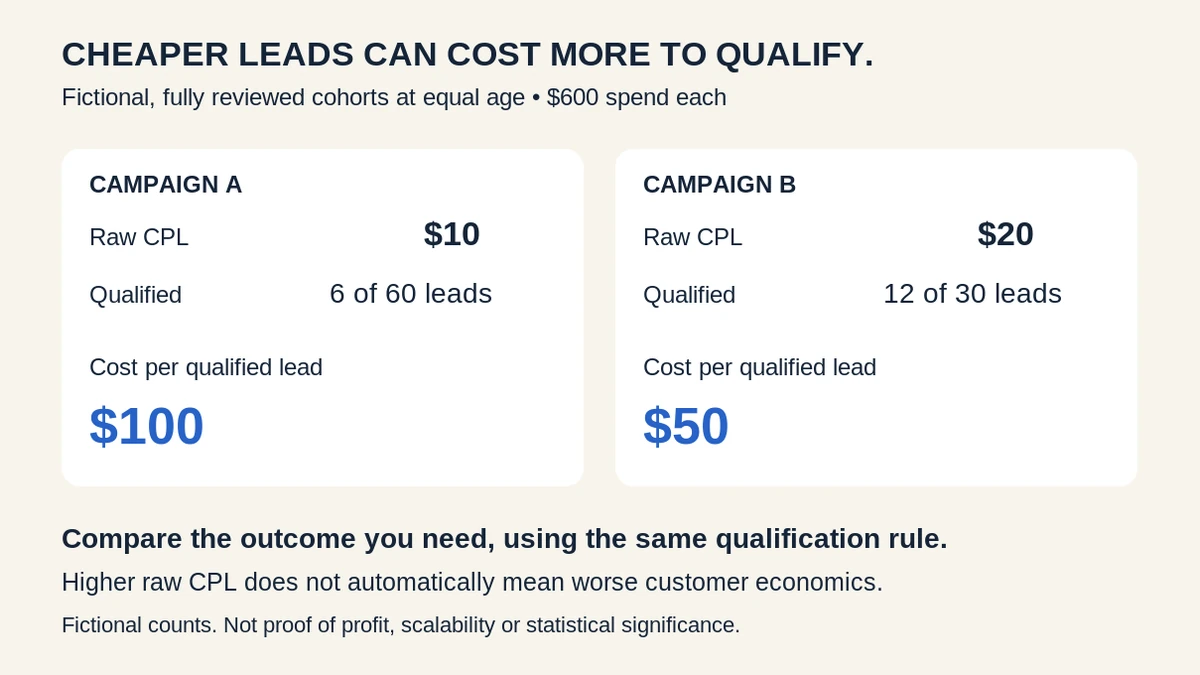
Open the diagram at full size.
Fictional, equal-age cohorts: Campaign B has higher raw CPL but lower cost per qualified lead. These counts do not establish profit or statistical significance.
Campaign B has twice the raw CPL and half the cost per qualified lead. It also has lower ad spend per acquired customer in this example. That supports a closer look at B; it does not prove that B is profitable or will scale. Order value, margin, refunds and other costs are not supplied.
If raw CPL itself has suddenly changed, use the CPL increase diagnostic or the weekly reporting workflow for the broader comparison.
5. Match the symptom to one next check
| Symptom | Check first | Test only after that check |
|---|---|---|
| Many inquiries expect something free | Exact ad promise, price wording and form introduction | Make the paid offer and next step clearer |
| Inquiries are outside the offer’s scope | Form answers and stated eligibility | Add one useful qualification question or clearer scope wording |
| Valid records rarely receive a reply | Delivery, ownership and actual follow-up receipts | Fix assignment or test a clearer first message |
| Team reports missing leads | Source-to-destination matching | Repair the verified handoff failure |
| Quality falls only in the newest cohort | Age, pending reviews and the same scoring rule | Wait for comparable assessment before declaring a loss |
Keep the test narrow. If you change the creative, audience, form and follow-up simultaneously, it becomes harder to understand which change mattered.
For ad promise work, start with the Meta ads creative brief template. Put the real offer, qualification conditions and next step into the brief before generating a new concept.
6. Review follow-up without blaming the lead
A person who has not replied may be out of scope, but they may also have received an unclear message, a broken booking link, or no message at all. Verify what was sent and when.
Before drafting a follow-up, record:
- What the person requested.
- Which contact channel and permission context are documented.
- What has already been sent, including any reply or opt-out.
- One useful next step tied to the original request.
If permission is unknown, hold the outbound draft until it is verified. Stop the sequence on a reply, opt-out or completed next step rather than sending messages blindly.
For a fictional person who requested a paid course outline and agreed to email contact, a first reply could be:
Subject: Your course outline
Here’s the outline you requested: [verified link]. The course is self-paced and costs [verified price]. It assumes [stated prerequisite]. Which part are you hoping to use first?
That is an illustrative draft for review, not an instruction to contact your entire lead list. Fill the brackets with verified details and confirm that the wording matches the request.
7. Give Meta useful quality feedback when the setup supports it
Meta’s official CRM training describes connecting CRM data through Conversions API for CRM and optimizing toward qualified leads. It also covers monitoring integration status and lead coverage.
This is a separate technical implementation, with account-specific requirements. First establish a reliable qualification definition and downstream records. Then verify the available integration, matching, event mapping and campaign options in the actual account.
Do not label every form submission “qualified” simply to populate an event. Do not assume a CRM feedback connection exists because a lead appeared in a spreadsheet. Receiving leads and sending quality outcomes back are separate paths to verify.
Copy this lead quality audit prompt
Use aggregates or anonymized aliases. Do not paste personal contact details or sensitive form answers.
Audit a Meta lead-generation cohort using only my supplied evidence.
This is read-only analysis. Do not send messages, alter records,
change campaigns or claim to have inspected an integration.

Inputs:
- Offer and advertised promise:
- Conversion location and source form alias:
- Cohort dates, currency, account time zone and assessment age:
- Qualification rule and review window:
- Spend and submitted lead counts by campaign:
- Counts: pending, invalid, out of scope, qualified, duplicate/test:
- Source-to-CRM delivery evidence and any transfer failures:
- Contact permission, attempts, replies and opt-outs (aggregated):
- Matched customers, refunds and revenue if actually known:

Tasks:
1. Flag missing data, overlapping statuses, incompatible dates
   and unequal assessment ages. Do not turn unknowns into zero.
2. Calculate raw CPL, qualified/submitted lead rate and cost per
   qualified lead. Show numerator and denominator for each.
3. Where matched data exists, calculate ad spend per customer.
   Do not call this profit or fully loaded acquisition cost.
4. Separate acquisition fit, delivery, review and follow-up issues.
5. Recommend one evidence check, followed by one test only if
   that check supports it. Label hypotheses explicitly.
6. Draft a client update under 100 words without invented causes.
7. List what remains unverified before any account change.

Use calculation tools if available; otherwise show arithmetic.
Do not draft outbound messages when permission is unknown.
Want a repeatable review for the next lead batch?
You can use the checklist and prompt above without purchasing anything. If you repeatedly turn lead reports into client updates, see Athena's 6-agent kit, including Agent 05 (Campaign report builder). The audit prompt and follow-up example in this article remain available inline.
It's a one-time purchase; applicable tax and AI/tool costs are separate. You run the agents in your own AI app and review the output. They do not deliver leads into a CRM or send emails.
If the next step is improving the ad promise, try the free AI Creative Brief Builder first. It helps draft one concept; it is not a lead-routing tool.
Common questions
Are Facebook lead ads always low quality?
Judge your own matched cohorts. A submitted lead does not establish qualification, and a complaint about “bad leads” does not identify the failed step. Check fit, delivery and follow-up separately.
Should I switch from instant forms to a landing page?
Treat that as a test rather than an automatic repair. Compare the same offer and qualification rule, assess at comparable ages and use qualified-lead cost or customer economics rather than raw CPL alone. Also verify the new submission and tracking path before using it.
Is adding more form questions always better?
No universal rule follows from this checklist. A question should help assess a real qualification condition. Test whether it changes submitted volume, qualified volume and downstream outcomes; extra friction without useful information may simply lose inquiries.
Can AI fix lead quality?
AI can help organize supplied evidence and draft briefs or reviewed messages. It cannot establish fit from missing records, repair an uninspected integration or guarantee better buyers.
Method and references
The checklist, scorecard, fictional comparison and prompts are Athena’s original educational material. They are not a report of client performance or a statistical test.
- Meta Blueprint: Improve Lead Quality with Conversions API for CRM — official overview of downstream feedback and integration monitoring.
- Athena product details — workflow contents, examples and compatibility limits.