
How to Use Claude for Meta Ads: A Practical Beginner’s Workflow
Learn how to use Claude for Meta Ads with CSV exports, practical prompts, and checks that turn campaign data into clearer reports and creative tests.

You can use Claude for Meta Ads by giving it an Ads Manager export, a clear business goal, and a specific question. Start with one job: explain a change in campaign performance, draft your next creative test, or turn report rows into a useful update. Live account access is optional for these tasks.
The setup matters less than the evidence. If Claude cannot see your conversion definition, comparison dates, or actual ad copy, its recommendations will be built on gaps.
This guide walks through a simple file-based workflow for an individual Meta ads specialist or solopreneur. You will get four starter prompts, a worked example, and a practical way to decide when a connector is worth adding.
What can Claude do with your Meta Ads data?
Claude can help organize supplied campaign data, calculate metrics, compare periods, draft explanations, and develop creative ideas from an offer brief. A useful output connects three things: what changed, what the evidence supports, and what to check next.
There are three different setups:
- Uploaded files: you supply a report or brief. Claude analyzes that snapshot. It cannot see changes made after the export.
- A connected assistant: an enabled connector gives Claude access to particular account data or actions. Capabilities depend on the connector, account access, and permissions.
- A scheduled workflow: a separate scheduling feature or automation system triggers the work. Typing “monitor this daily” into an ordinary chat does not prove that a recurring job exists.
For your first analysis, use an export. It keeps the question small and makes the answer easier to check.
Step 1: Choose one decision you need to make
“Optimize my Facebook ads” is too broad. Choose a question tied to a decision you can take this week:
- Why did purchase CPA increase compared with the previous period?
- Which creative angle deserves another test?
- Does the landing page deliver the offer promised in the ad?
- What should my weekly performance update say?
Write down the intended result before opening the chat. For example: “I want to understand whether the CPA increase came with more expensive traffic or a lower purchase rate after the click.” That question gives the analysis a direction without deciding the answer in advance.
Step 2: Prepare a small, comparable export
In Meta Ads Manager, choose the correct account, reporting dates, and reporting level. Customize the columns to your question and export a CSV. Menu labels can change; keep a note of the settings used for the export.
For a sales campaign comparison, include:
- Campaign, ad set, or ad ID and name, at one consistent level.
- Reporting start and end dates, account currency, and time zone.
- Spend, impressions, link clicks, and landing page views where available.
- The specific purchase metric you use, plus purchase conversion value when available.
- Attribution setting and a note of recent budget, creative, website, or tracking changes.
Use comparable periods, such as two complete seven-day windows. Avoid comparing a partial Monday morning with a full previous week. For sparse purchase data, a longer window may be more useful; seven days is a starting example, not a universal rule.
Do not mix campaign totals with the ad-level rows underneath them. That can count the same spend twice. Keep total rows separate from detail rows and tell Claude what each file represents.
Remove customer contact information and other unnecessary personal data. Account and campaign names can be replaced with consistent labels.
Claude supports CSV uploads. Attach the file with the chat’s add-file control or drag it into the conversation; Anthropic’s file upload guide lists current formats and limits.
Step 3: Make Claude check the data before analyzing it
Start with this prompt after attaching the export:
Analyze the attached Meta Ads CSV for one account. First tell me the file name, row count, reporting level, date range, currency, and conversion definition you can verify. Flag missing fields, duplicate rows, mixed reporting levels, and totals that should be excluded from aggregation. Compare the two periods only if they are comparable. Do not invent missing values. Stop and ask for the smallest missing input if it prevents a reliable answer.
This check catches a common failure: a polished explanation of a file the AI has misunderstood. If Claude describes columns that are not present, correct the input before asking for recommendations.
Next, give it context in a short brief:
Offer: [what is sold and its price]. Intended conversion: [exact event]. Business goal: [goal]. Target CPA, if established: [amount and basis]. Recent changes: [known changes or unknown]. My question: [one decision]. Use only the supplied evidence and label any explanation that still needs testing.
Step 4: Ask for calculations and a diagnosis you can inspect
Use a calculation-first prompt:
Compare the two periods. Recalculate purchase CPA as total spend divided by total purchases, link CPC as total spend divided by link clicks, and ROAS as purchase conversion value divided by spend when those inputs exist. Show the source totals, formulas, and percentage changes. Use N/A for undefined ratios. Then separate observed changes, possible explanations, and the next check. Do not treat correlation as proof or change the ad account.
Here is a fictional example, created to demonstrate the reasoning:
| Metric | Previous period | Current period |
|---|---|---|
| Spend | $500 | $500 |
| Link clicks | 500 | 625 |
| Purchases | 25 | 20 |
| Link CPC | $1.00 | $0.80 |
| Purchase CPA | $20 | $25 |
| Purchases ÷ link clicks | 5.0% | 3.2% |
Spend stayed flat. Link clicks increased 25%, and link CPC fell 20%. Purchases fell 20%, so purchase CPA rose 25%.
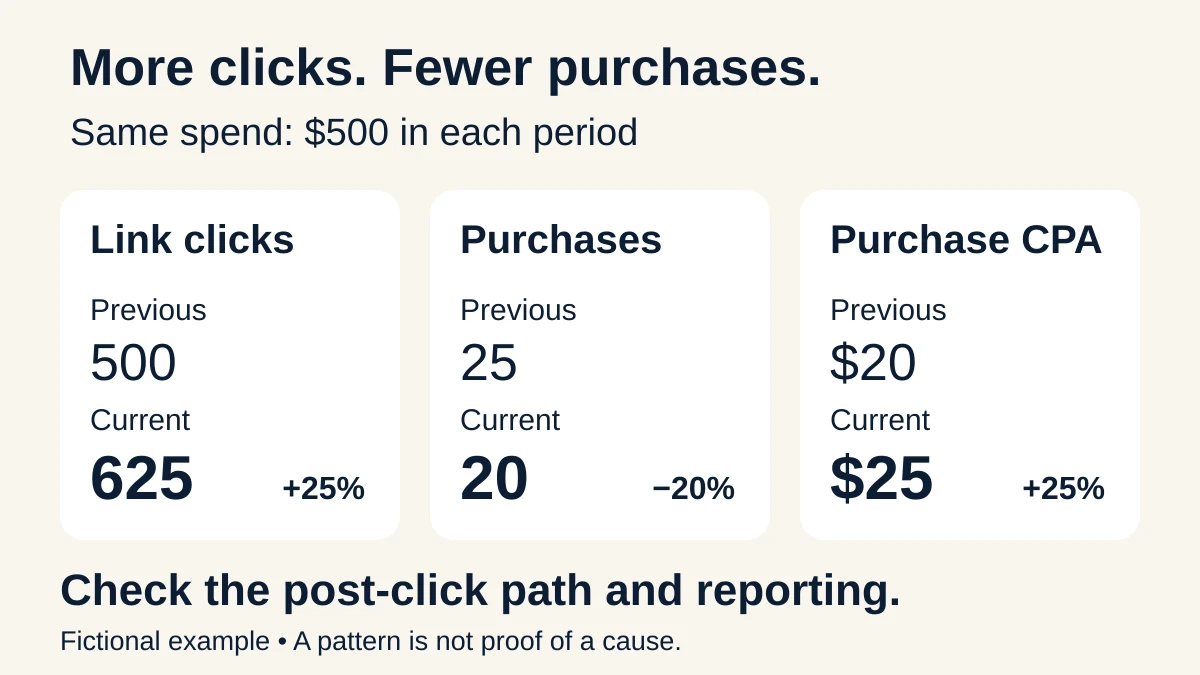
Fictional example. More clicks can accompany fewer purchases; inspect the post-click path and reporting before deciding what caused the change.
The first issue to investigate is the lower observed purchases-to-link-clicks ratio. Check landing page views, checkout behavior, traffic mix, offer changes, and conversion reporting before concluding that the creative needs replacing.
That ratio is a diagnostic comparison, not a matched-user conversion rate. Attributed purchases can include interactions other than the link clicks in the same report. The table also cannot prove that the landing page caused the decline.
Step 5: Turn one finding into one useful deliverable
Choose the output that matches the finding. If the question is about performance, request a brief with the numbers, the most important uncertainty, and one next action. If the evidence points toward an offer or message problem, develop a creative test.
For a creative test, use this starter prompt:
Using this product brief and the supplied ad examples, propose three distinct creative angles for [audience]. For each, give the customer problem, one headline, primary text, a visual brief, and the hypothesis the test would examine. Use only verified product features. Label any missing proof. Do not invent customer quotes, results, or urgency. Keep the offer and landing-page promise consistent.
Three angles should give you three different reasons to care, not the same headline with synonyms. For a downloadable meal planner, that might mean easier shopping, less daily planning effort, or one place to organize the week—provided those benefits match the actual product.
If creative is your immediate bottleneck, try Athena’s free creative brief prompt. It gives you a focused way to start with your own offer.
Step 6: Verify the answer before you use it
Check the numbers against the export and a calculator or spreadsheet. Confirm that “CTR” means the same click metric throughout. Make sure any recommendation identifies the correct campaign or ad.
Keep four questions beside the output:
- Can I trace each number to a supplied row or calculation?
- Does the explanation distinguish evidence from a hypothesis?
- Is the suggested action reasonable given conversion volume and recent changes?
- What observation would tell me the action helped?
A suggestion to pause an ad after one expensive purchase needs more context. A claim that tracking is broken needs more than a difference between two dashboards. “Insufficient evidence” can be the most useful answer when it prevents an unnecessary change.
For a recurring reporting routine, follow our AI Meta Ads reporting workflow.
When should you add a Meta Ads MCP connector?
Consider a connector when repeatedly exporting the same data has become the bottleneck. MCP, short for Model Context Protocol, provides a standard way for AI applications to communicate with tools and data sources; it does not itself decide which advertising actions are available. See the MCP architecture overview.
Follow the connector provider’s current setup instructions and Anthropic’s custom connector guide. After connecting, test a narrow read: one account, one completed date range, and spend plus the exact purchase metric. Compare the result with Ads Manager using the same settings.
Only add account-changing actions after that read works. A useful change proposal names the exact object, current setting, proposed setting, reason, and verification step. Keep a record of what actually changed.
If the connector is unavailable, the file-based workflow still works. If you need recurring monitoring, verify that a scheduled job runs, retrieves fresh data, and delivers its output through the intended channel.
Frequently asked questions
Can I use Claude for Meta Ads without connecting my account?
Yes. Supply an export, a clear question, and relevant business context. The analysis covers the data you provide; it does not automatically refresh when your account changes.
Can Claude launch or edit Facebook ads?
Only when the environment provides a suitable connected tool, the account has access, and the action is permitted. An uploaded CSV or a prompt file alone cannot make live account changes.
Will an AI prompt improve my ROAS?
A prompt can help structure analysis and testing. It cannot guarantee a result. Your offer, creative, website, measurement, and advertising decisions still determine what happens.
Make your next Meta Ads task easier to start
The useful habit is simple: bring clear inputs, ask one question, inspect the answer, and turn it into a testable next step.
If you want reusable instructions for recurring ad work, get Athena’s six AI agent automation prompts for $49 one-time. You run the prompts in your own AI environment. AI services, connected tools, and applicable tax are separate; live actions depend on the tools and access available to you.
Prefer to see the approach first? Start with the free creative brief.